Architecting Headless WordPress: Next.js, REST, and Automated CI/CD with GitHub Actions
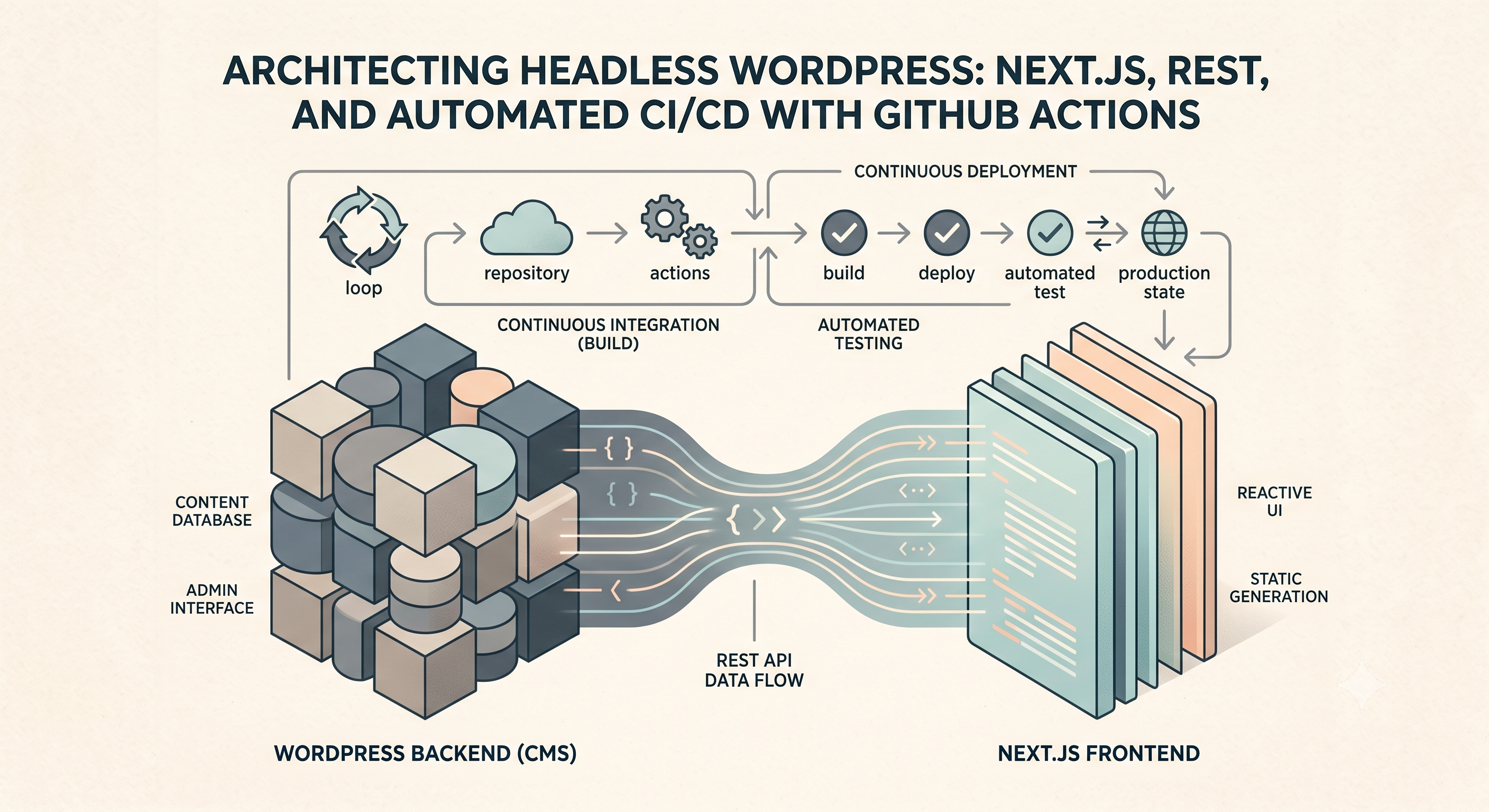
My journey into modern web development quickly led me to question the traditional coupled WordPress setup. While fantastic for many use cases, a monolithic architecture often presents performance and scalability bottlenecks for high-traffic applications or when complex frontend experiences are required. This is precisely where the power of a headless WordPress configuration, leveraging its robust REST API, coupled with a modern JavaScript framework like Next.js and automated CI/CD via GitHub Actions, truly shines. I've found this approach offers unparalleled flexibility, speed, and a significantly improved developer experience.
At its core, a headless WordPress implementation treats WordPress purely as a content management system, decoupling the backend data layer from the frontend presentation layer. WordPress's built-in REST API is the crucial bridge here, exposing all your posts, pages, custom post types, and taxonomy terms as JSON endpoints. For instance, accessing your posts is as simple as hitting `https://yourdomain.com/wp-json/wp/v2/posts`. Beyond the standard endpoints, I frequently extend the API to include custom fields or specific data relationships. This can be achieved using `register_rest_field` in your theme's functions.php or a custom plugin, allowing you to append ACF fields or other meta to existing objects. For example, to expose a custom meta field named 'my_custom_value' on posts:
add_action( 'rest_api_init', function () { register_rest_field( 'post', 'my_custom_value', array( 'get_callback' => function( $object, $field_name, $request ) { return get_post_meta( $object['id'], $field_name, true ); }, 'update_callback' => null, 'schema' => null, ) ); });
This snippet registers a new field for the 'post' post type, making `my_custom_value` available in the REST API response for each post. This fine-grained control over the API response is essential for building efficient frontends.
On the frontend, I typically reach for Next.js due to its strong performance characteristics, SEO benefits with server-side rendering (SSR) and static site generation (SSG), and excellent developer experience. Consuming the WordPress REST API in a Next.js application is straightforward. For example, fetching a list of posts for a blog index page might look like this within a `getStaticProps` function:
export async function getStaticProps() { const res = await fetch('https://yourdomain.com/wp-json/wp/v2/posts?per_page=10'); const posts = await res.json(); return { props: { posts }, revalidate: 60 // Incremental Static Regeneration }; }
This fetches the latest 10 posts at build time, and then regenerates the page every 60 seconds if new data is available, ensuring fresh content without rebuilding the entire site. This static generation dramatically boosts page load times and reduces server load, a significant improvement over traditional dynamic WordPress page loads.
The final piece of this advanced architecture is automated CI/CD deployments for the Next.js frontend, managed by GitHub Actions. Manual deployments are prone to errors and consume valuable development time, especially for frequent content updates. A GitHub Actions workflow ensures that every time I push changes to the main branch of my frontend repository, the application is automatically built and deployed to a platform like Vercel or Netlify. Here’s a simplified `deploy-frontend.yml` example for deploying to Vercel:
name: Deploy Next.js Frontend
on: push: branches: - main
jobs: build-and-deploy: runs-on: ubuntu-latest steps: - name: Checkout repository uses: actions/checkout@v3 - name: Setup Node.js uses: actions/setup-node@v3 with: node-version: '18' cache: 'npm' - name: Install dependencies run: npm install - name: Build Next.js app run: npm run build - name: Deploy to Vercel env: VERCEL_ORG_ID: ${{ secrets.VERCEL_ORG_ID }} VERCEL_PROJECT_ID: ${{ secrets.VERCEL_PROJECT_ID }} VERCEL_TOKEN: ${{ secrets.VERCEL_TOKEN }} run: npx vercel deploy --prebuilt --prod
This workflow automates the entire deployment process, from checking out the code and installing dependencies to building the Next.js application and deploying it to Vercel. Crucially, sensitive credentials like VERCEL_ORG_ID, VERCEL_PROJECT_ID, and VERCEL_TOKEN are stored securely as GitHub Secrets, never exposed directly in the workflow file. This ensures consistent, rapid, and secure deployments with every code change, allowing me to focus on development rather than deployment logistics.
Embracing headless WordPress, a modern frontend, and robust CI/CD pipelines has fundamentally transformed how I build and maintain web projects. It’s a powerful stack that delivers high performance, excellent scalability, and a developer-friendly workflow, setting the stage for future-proof web applications that are both a joy to build and use.