Decoupling WordPress: Building a Headless Backend with CI/CD for Production
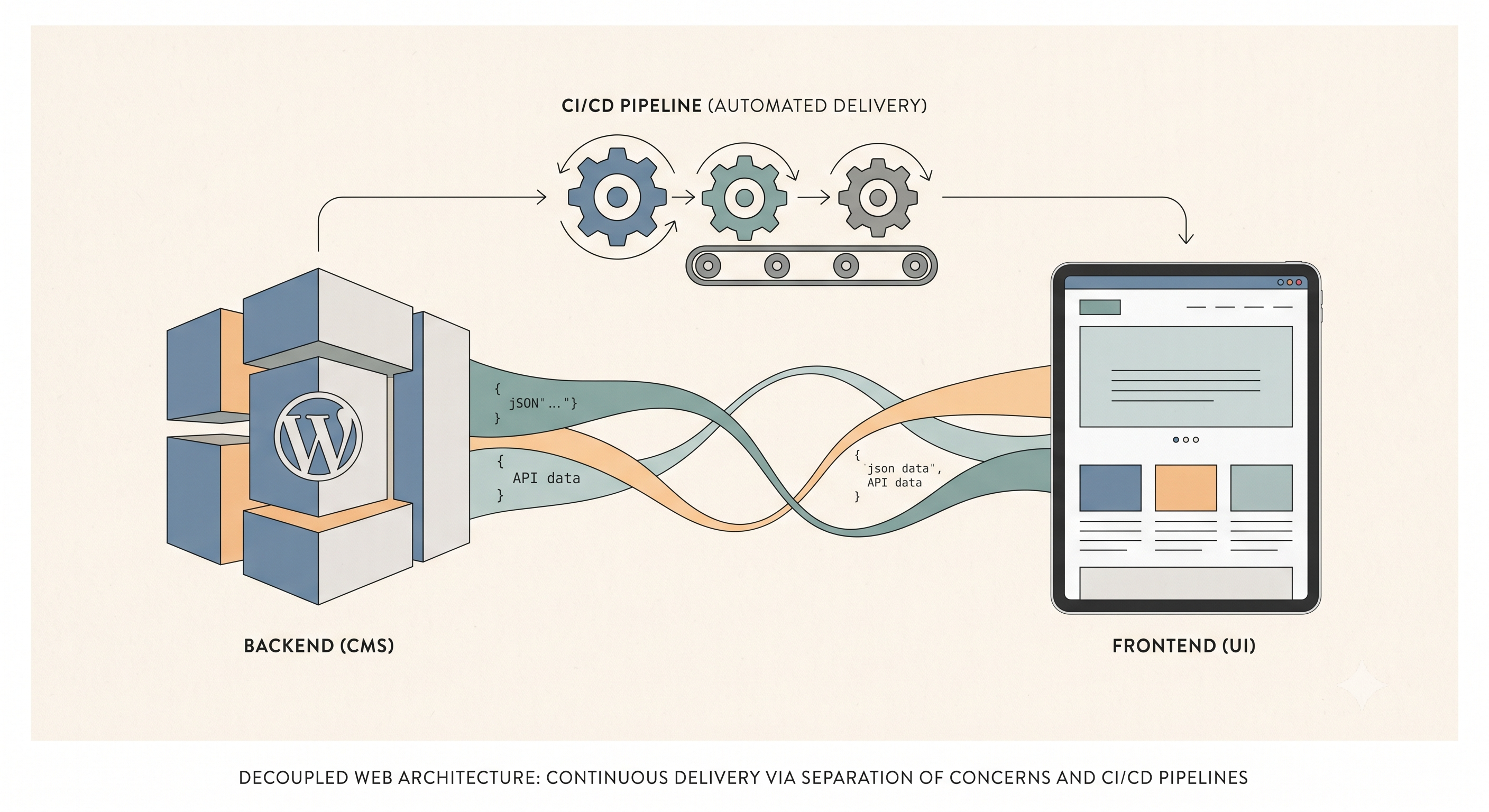
I've spent years pushing WordPress beyond its blog-centric origins, and lately, my focus has shifted dramatically towards leveraging it as a robust, headless CMS. This approach unlocks incredible flexibility, allowing me to pair WordPress's excellent content management capabilities with modern frontend frameworks and streamlined deployment workflows. Forget the days of tightly coupled themes; we're talking about pure content delivery via APIs and automated deployments that make traditional FTP feel archaic.
The core of a headless WordPress setup is its REST API. By default, WordPress exposes endpoints for posts, pages, categories, and tags at `/wp-json/wp/v2/`. For example, you can query your latest posts with a simple `curl` request: `curl -X GET https://yourdomain.com/wp-json/wp/v2/posts`. The real power, however, comes from extending this. I frequently use plugins like Advanced Custom Fields (ACF) and Custom Post Type UI to define complex content structures—think "Products," "Services," or "Team Members" with custom fields for images, related content, or unique data points. Crucially, ACF fields are automatically exposed via the REST API, or if not, a small `functions.php` snippet using `register_rest_field` can make them available. This transforms WordPress into a dedicated content repository, leaving the presentation layer entirely to a decoupled frontend built with React, Vue, or Next.js.
Moving past content delivery, the next hurdle is deployment. Manually pushing changes to a custom theme or plugin through FTP is slow, error-prone, and utterly incompatible with a professional development workflow. This is where automated CI/CD pipelines, specifically GitHub Actions, become indispensable. My goal is always to have code pushed to a `main` branch trigger an automatic deployment to a production server, ensuring consistency and speed.
Here’s a simplified GitHub Action workflow I'd use to deploy a custom theme directory (`my-custom-theme`) to a remote server via `rsync` over SSH. This assumes you've set up SSH keys and stored your server credentials as GitHub Secrets:
```yaml name: Deploy Custom Theme to Production
on: push: branches: - main paths: - 'wp-content/themes/my-custom-theme/**'
jobs: deploy: runs-on: ubuntu-latest steps: - name: Checkout code uses: actions/checkout@v3
- name: Setup SSH uses: webfactory/[email protected] with: ssh-private-key: ${{ secrets.SSH_PRIVATE_KEY }}
- name: Deploy with rsync run: | mkdir -p ~/.ssh echo "${{ secrets.SSH_KNOWN_HOSTS }}" > ~/.ssh/known_hosts chmod 600 ~/.ssh/known_hosts rsync -avz --delete \ wp-content/themes/my-custom-theme/ \ ${{ secrets.SSH_USERNAME }}@${{ secrets.SSH_HOST }}:/var/www/html/wp-content/themes/my-custom-theme/ ```
In this YAML, `on: push` targets only changes within our custom theme directory on the `main` branch. The `Setup SSH` step uses a community action to inject our private key (stored securely as `SSH_PRIVATE_KEY` in GitHub Secrets). The `Deploy with rsync` step then sets up `known_hosts` to prevent host key verification issues and executes `rsync`. The `rsync -avz --delete` command archives, verbosely, compresses, and crucially, deletes extraneous files on the destination, ensuring the remote directory mirrors our local `my-custom-theme` exactly. The target `/var/www/html/wp-content/themes/my-custom-theme/` would be your actual theme path on the production server.
Embracing headless WordPress combined with robust CI/CD practices fundamentally changes how I approach WordPress development. It separates concerns beautifully, enhances scalability and performance by decoupling the frontend, and most importantly, provides a reliable, automated deployment pipeline. This isn't just about faster deployments; it's about building more resilient, maintainable, and modern web applications with WordPress acting as a powerful, unsung hero in the backend.